
Policy Preview & Testing
This article will walk you through the process of efficiently testing your travel policies without the hassle of navigating multiple steps. Let’s dive in!
Streamlined Testing Process
With our system, you can test the Air policy directly, eliminating the need to go through the traditional steps of:
Going to the Trip Invites
Selecting a traveler
Clicking on the traveler booking link
Reviewing the results
Returning to the browser session with the TempoTrip Admin
Backing out of the traveler link
Selecting the policy
Making changes to the policy
Repeating the process
Making Changes and Previewing
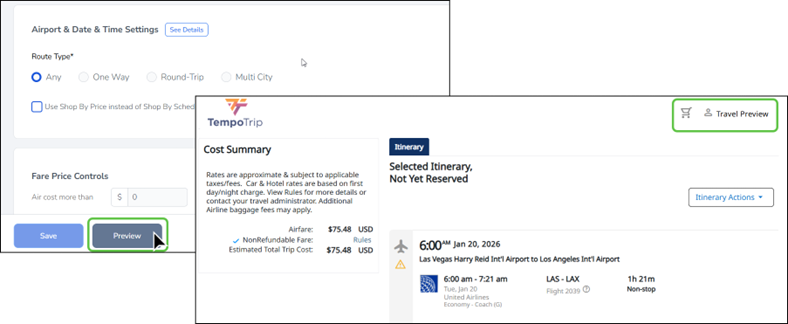
Once you have made the necessary changes to the policy, simply click on the Preview Button. This action will launch the Booking Widget, displaying the input request screen. It’s a quick and user-friendly way to test the calendar display and fare search results.
Limitations to Keep in Mind
While this method is efficient, please note that full end-to-end testing cannot be completed. Specifically, once flights are selected from the Matrix/Flight Results page and you reach the Itinerary/Cost Summary page, the booking cannot be finalized. You will notice that there is no Next button available, and the “traveler name” in the top-right corner will indicate “Travel Preview.”
We hope this guide helps you navigate the testing process with ease!