
Payment Settings
Welcome to the Payment Settings Guide! This document will help you understand how to set up and manage your payment methods for a seamless booking experience. Whether you're using centrally billed cards or allowing travelers to pay directly, we've got you covered!
Setting Up Payment Methods
In this section, we will walk you through the process of setting up Central Billing Payment Cards, which are essential for managing payments in your policy.
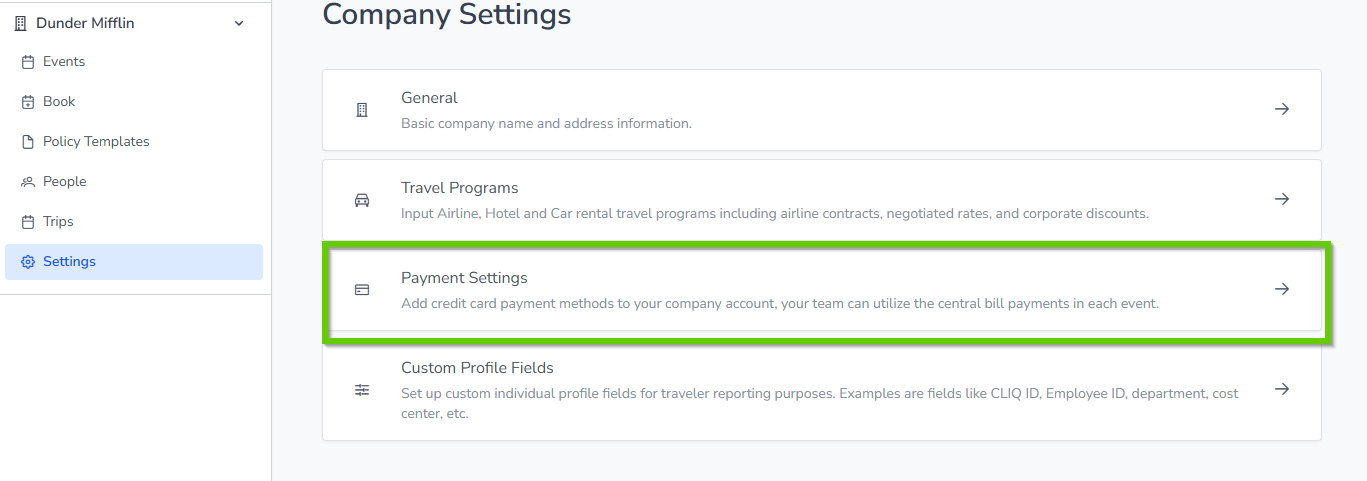
Central Billing Cards: Before applying any cards to a policy, ensure that the Central Billing cards are set up first.
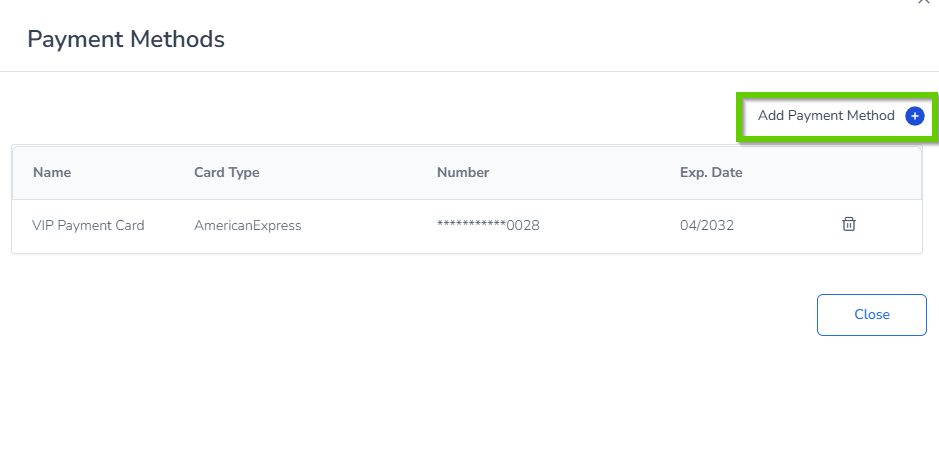
Adding and Deleting Cards: You can easily add or delete cards as needed. However, please note that there is no option to edit card information once it has been entered.
Adding a New Card: To add a new payment method, simply click on the Add Payment Method link. Fill in the required information and click Save. Your cards will then be displayed in a list, showing the card name, type, masked card number, and expiration date.
Payments options in each Policy
Centrally Billed Credit Card
When enabled on the 'Policy', all bookings will be charged to a single credit card. This means that travelers cannot change, view, or modify card details during checkout, making the process straightforward and hassle-free. To add a new card, navigate to Main Dashboard → Settings → Payment Settings.
Note: The Centrally Billed card payment must be set up first in Settings under Payment Settings before it can be selected as an option for a policy.
Traveler Pay
Travelers have the option to pay directly for their bookings using their preferred credit card. During the checkout process, they will be prompted to enter their card information to securely complete their reservation.
Centrally Billed Options
For added flexibility, cash, check, or freeform payments can be utilized. This feature is controlled by agency logins. If a company wishes to use cash, check, or freeform/invoiced payments, they will need to request the agency to enable this option. Please note that this choice will be hidden from company roles.
If the agency checks the "Agency Controlled" box, then the Central Billed and Traveler Pay options will be hidden from the Company Admin. If Freeform is selected, the Account Number field will be available for input.
For a view from company roles when the agency invokes Agency Controlled for cash, check, or freeform payment, please refer to the appropriate documentation.
