
Creating a New Event
Welcome to our guide on setting up a new event! Whether you're planning a small gathering or a large conference, we've got you covered with simple steps to ensure everything runs smoothly. Let's dive in!
Steps to Set Up a New Event
Create Event
Create Policy/Policies
Invite Attendees
Create an Event
To get started with creating your event, follow these easy steps:
Click on Events in the left-hand menu, then click the Create Event button.

Event Details
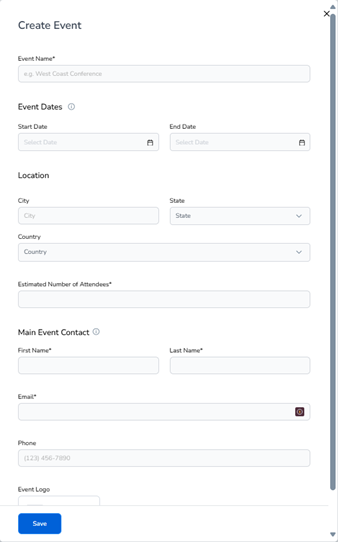
When creating your event, you'll need to fill out the following information:
Event Name: (required)
Event Dates: (optional)
Location: City, State, Country (optional)
Estimated Number of Attendees: (required)
Main Event Contact:
First Name and Last Name: (required)
Email: (required)
Phone: (optional)
Logo: (Optional) – can be your company logo or an event logo.
And that's it! You're now ready to create your event and start inviting attendees.